Official Florida 4-Point & Wind Mitigation — pre-filled from government records

Type in the address. The official inspection forms pre-fill themselves.

Inspector Gadgets pulls the property's county and state records — owner, parcel, year built, flood zone, design wind speed, permit history — and drops them straight into the official Florida 4-Point and Wind Mitigation forms. Walk the house, shoot the guided photos, and it drafts the findings and outputs the finished, signed PDF, ready to email the client. You approve every line — you just never hand-type a parcel number again.

Card on file, but the trial isn't charged. Run one complete job start to signed. Cancel anytime — your saved work stays yours.

Pre-filled from public recordsOfficial FL state PDFsFirst inspection freeNothing to install
Inspector Gadgets · York InspectionsSheet 1 of 1
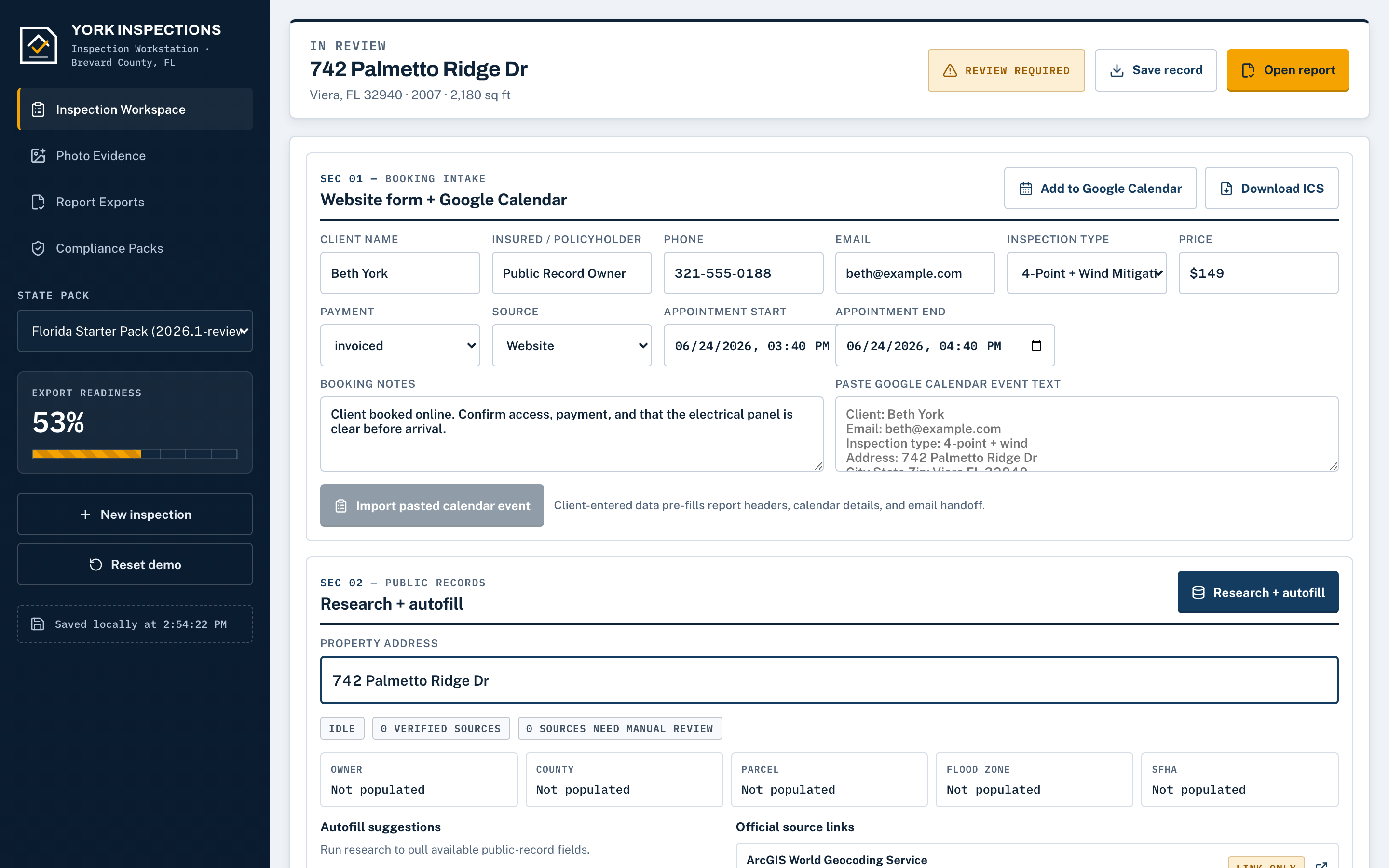
The inspection workstation: booking intake, county research, and readiness gauge

Sec 01 — The job doesn't end when the inspection does

You already worked today. Then the paperwork makes you work again.

The second shift nobody pays you for

You finished the walkthrough at 3. Then you got home, ate dinner, and sat back down at the kitchen table to type up the 4-Point and pencil in the wind-mit form. That's an evening — every evening you inspect — that your family doesn't get and nobody writes you a check for.

The drive-back that eats half a day

You're already down the road when it hits you: you never got the clean shot of the panel label or the water-heater data plate. Now it's 40 minutes there, 40 back, and a job slot you could've sold — gone, over one photo you didn't leave with.

The number that didn't match

A year built is off, a field got guessed at 9pm because you were tired, and the carrier bounces the report. Now you're re-opening a closed job, making the awkward call, and doing free work on your own Saturday to fix something a second set of eyes would've caught.

Sec 02 — The transformation

Same inspection. The paperwork's the part that changes.

Before · the kitchen table
County research dug up by hand before you even leave, then typed up again after dinner.
Reports keyed at the kitchen table at 9pm, squinting at data plates you can barely read.
Driving back across the county for the one shot you forgot.
Guessing a blank to finish the form — and hoping the carrier doesn't catch it.
After · Inspector Gadgets
Records pulled in one tap, on-site, every value showing its source with a link.
Official forms filled during the walkthrough and signed in the driveway.
A guided checklist names every required shot before you pull away — no drive-back.
Unverified fields left blank, never guessed, and you approve every finding yourself.

Sec 03 — The real workflow, in order

Booking to signed report, without the kitchen table.

Want it choice by choice? See the full step-by-step walk-through →

01

Paste tomorrow's booking

Drop it straight in from Google Calendar, import an .ics, or type it. The appointment syncs right back to your calendar.

02

One tap pulls the county record

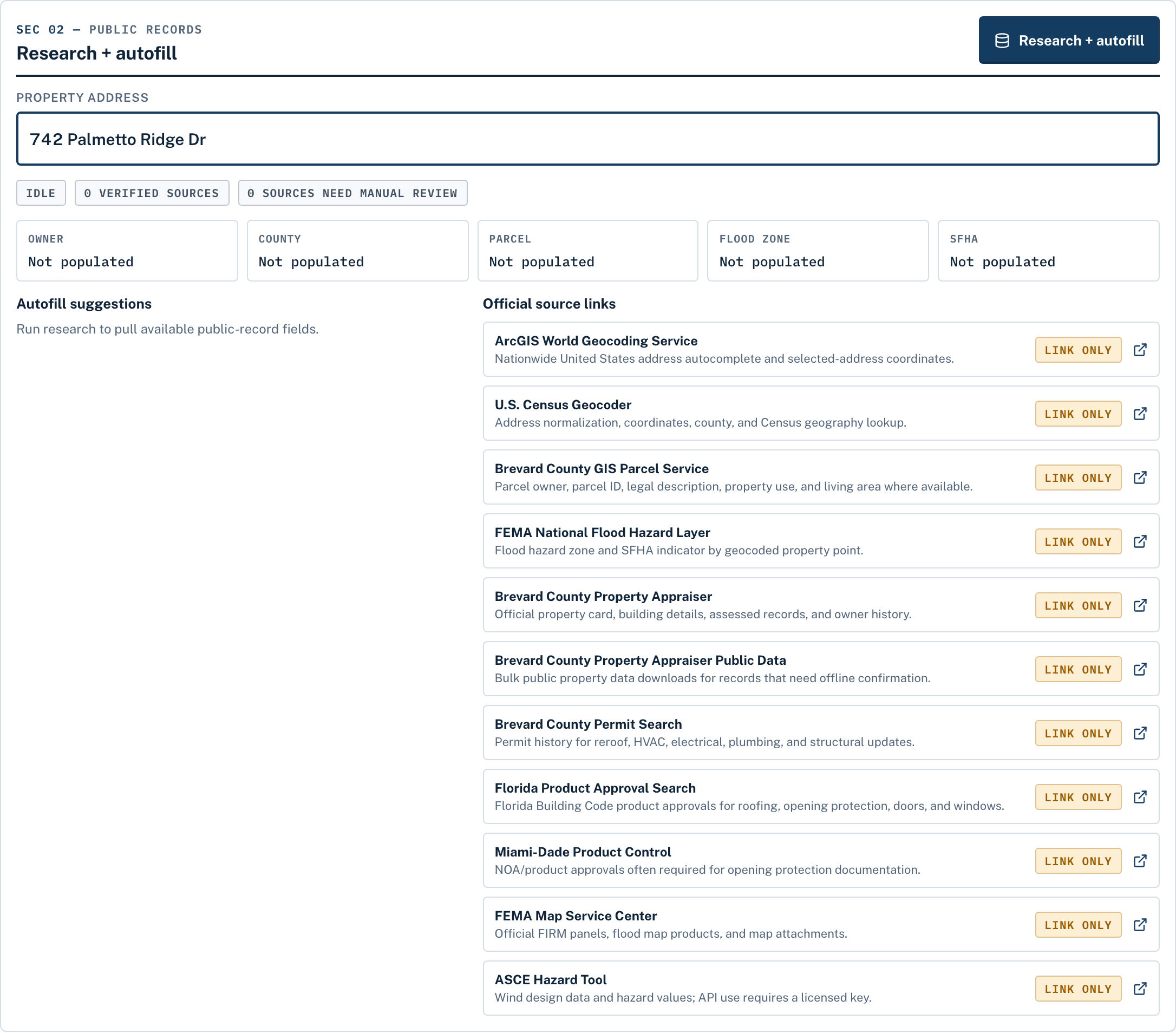
Owner, parcel, year built, square footage, flood zone, design wind speed, and permit history — statewide FL from FDOR, county appraisers, and permit portals. Every value shows its source with a link, and you can override anything.

03

Work the guided photo checklist

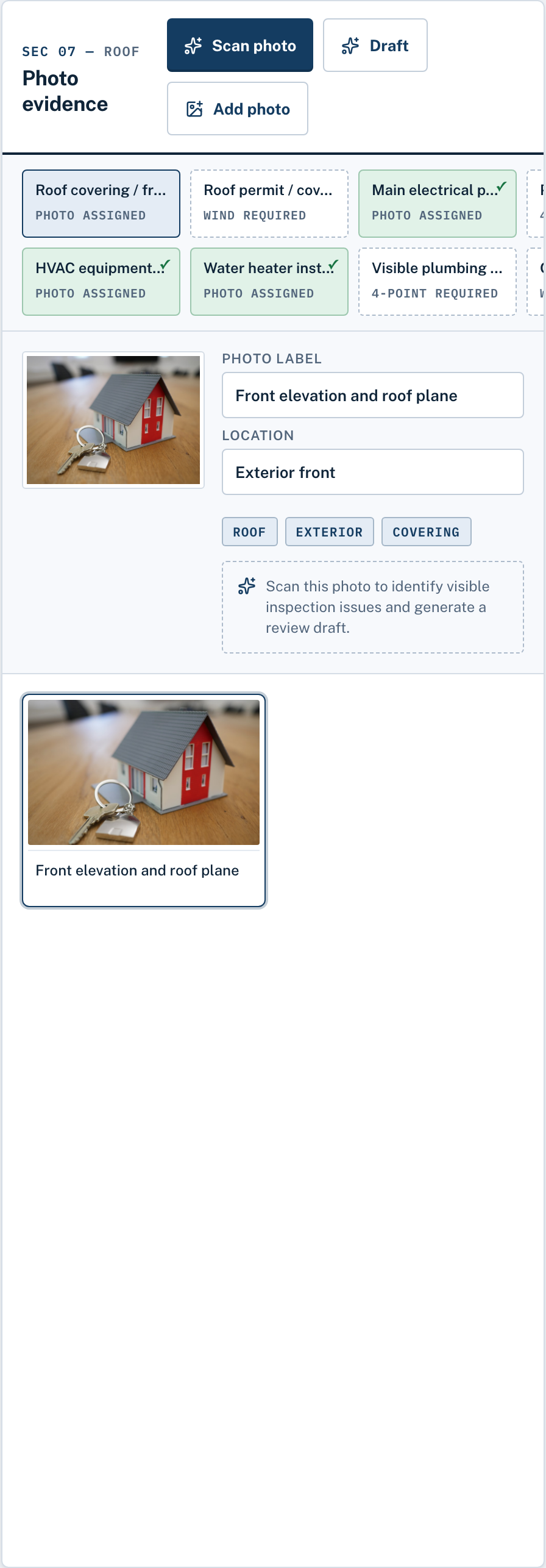
It maps to exactly what the 4-Point and Wind Mit forms require — panel label, HVAC plate, water heater, roof, opening protection, elevations, roof-to-wall. Bulk-import auto-sorts your shots into the right slots, so you leave with every one.

04

The app drafts, you decide

It reads each photo, drafts the finding, and pencils in the form answer — OCR-decoding data plates into appliance age right on your device. You approve, edit, or reject every single suggestion. Nothing enters the report on its own.

05

Sign in the driveway

Export the official Florida 4-Point (2025) and Wind Mitigation OIR-B1-1802 (Rev. 04/26) PDFs on the real state templates, with captioned photo pages appended. Email the client from a saved template or share a view-only link — before you pull off the curb.

Step 02 — County researchOne tap
County research panel pulling owner, parcel, and flood zone from official public records
Step 03 — Photo checklistGuided shots
Guided photo checklist mapped to the 4-Point and wind mitigation forms

Sec 04 — What you're actually getting

The work happens on-site. Your evening stays yours.

Done during the walkthrough, not after dinner

Paste the booking, tap once for the county records, shoot the guided checklist, and the app drafts the findings and pencils in the answers as you go. You approve each one and export the official PDFs before you leave. The state licensed your eye and your signature — not your typing speed. Spend the job inspecting, not keying parcel numbers after dark.

Leave every property done — no drive-backs

The checklist maps to exactly what the forms require, and the report can't be finalized until every required item is there. Bulk-import auto-sorts your shots into the right slots, so a forgotten panel label can't send you back across the county. Every required photo, checked off, before you pull out of the driveway.

Filled right, so fewer come back

Every pulled value shows its official source with a link — when a carrier questions a number, you point to the record. Anything the app can't verify is left blank, never guessed, and when the AI isn't sure it says so and asks for a better photo instead of inventing one. Fewer kickbacks, fewer redos, fewer "the number didn't match" calls on your weekend.

Sec 05 — Faster at every step

The parts that used to eat your time? The app just does them.

Every step that meant re-typing, tab-hopping, or a second trip across the county is handled for you now — so the whole job moves at the speed of the walkthrough.

Pasted — not re-typed One tap — not an evening of tabs Scanned — not squinted at Pre-filled — not hand-keyed One tap to the official PDF

Booking & scheduling

  • Paste a booking straight from Google Calendar — or import an .ics file
  • The appointment syncs right back to your calendar
  • Address autocomplete as you type
  • One dashboard of every upcoming inspection across your jobs

Records, pulled for you

  • One tap pulls owner, parcel, year built, square footage, flood zone, design wind speed & permit history
  • Statewide Florida — FDOR, county appraisers & permit portals
  • Every value shows its official source with a link
  • Pull an address once; it loads instantly next time — no re-fetch
  • Permit history imports roof, HVAC, electrical & plumbing dates

Photos that read themselves

  • A guided checklist maps to exactly what each form requires
  • Bulk-import auto-sorts your shots into the right slots
  • Scan a data plate — it decodes the serial into appliance age, on your device
  • Flag a defect photo and attach a recommendation
  • Rotate, crop & brighten a shot right there

Forms that fill themselves

  • Dropdowns drop the correct letter code onto the official form — opening protection, roof geometry, deck attachment
  • It drafts findings and pencils in answers from your photos
  • Remembers your past answers and suggests them
  • Owner auto-fills as the insured and the client
  • Anything unverified stays blank — never guessed

Sign & send in one place

  • A readiness gauge tells you the moment it's done
  • Official FL 4-Point (2025) & Wind-Mit (OIR-B1-1802) PDFs, with photo pages appended
  • Email the client from your saved template, or share a view-only link
  • A full Standards-of-Practice report for full-home jobs
  • View and export the PDF right in the app

Set up once, then forget it

  • Your license, initials, signature & logo saved and reused on every job
  • Keep multiple inspector profiles for a company
  • Runs in the browser — phone, tablet, or laptop, nothing to install
  • Always the latest version, no updates to chase
  • Your data lives on your device; back up any job anytime

Sec 06 — Don't take it on faith

The real tool, and the real forms it puts out.

You approve every finding

The app drafts and pencils in answers, but nothing lands in the report on its own — you approve, edit, or reject each one, and it won't finalize until you have. Your license does the signing.

The official state forms — not look-alikes

Exports are the real Florida 4-Point (2025) and Wind Mitigation OIR-B1-1802 (Rev. 04/26), filled on the actual state templates with your captioned photo pages appended.

Built on a job site, not in a boardroom

Built with York Home Inspections in Brevard County, around the way inspections actually run in Melbourne, Viera, and Rockledge. No testimonials, no user counts, no star ratings — just the tool and what it produces.

A full recorded inspection — booking to signed report — is available on request.
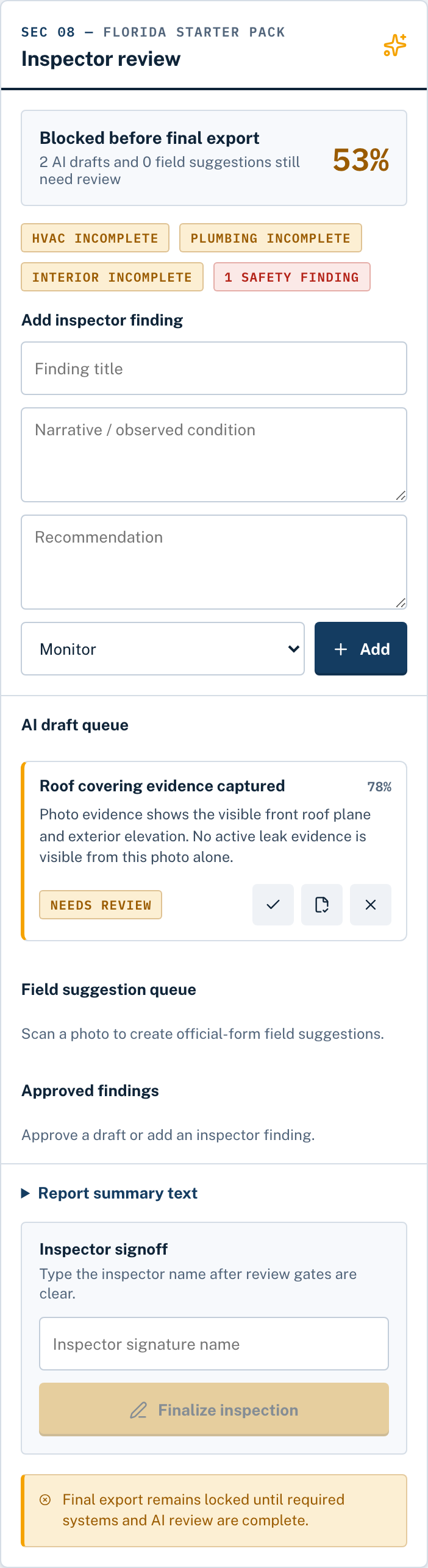
Review & approveYou have the final say
The review step where the inspector approves, edits, or rejects each drafted finding before signing

Sec 07 — What you hand over

Look as good on paper as you do on the roof.

No retyping into carrier portals, no lookalike templates. When the inspection is signed, everything the carrier, the agent, and your client expect is ready to send.

The Florida 4-Point

Filled in on the official state form — the one carriers actually ask for. Anything you didn't verify stays blank instead of guessed.

Wind mitigation

The official OIR-B1-1802, completed on the real template — the same form every underwriter already knows. Same rule: blanks stay blank.

A client-ready report

A polished, printable report that looks as professional as your work. Hand it to the agent without apologizing for it.

Every job, yours to keep

Save a complete copy of any inspection — photos, findings, forms, all of it. Your records stay in your hands, not locked inside somebody's software.

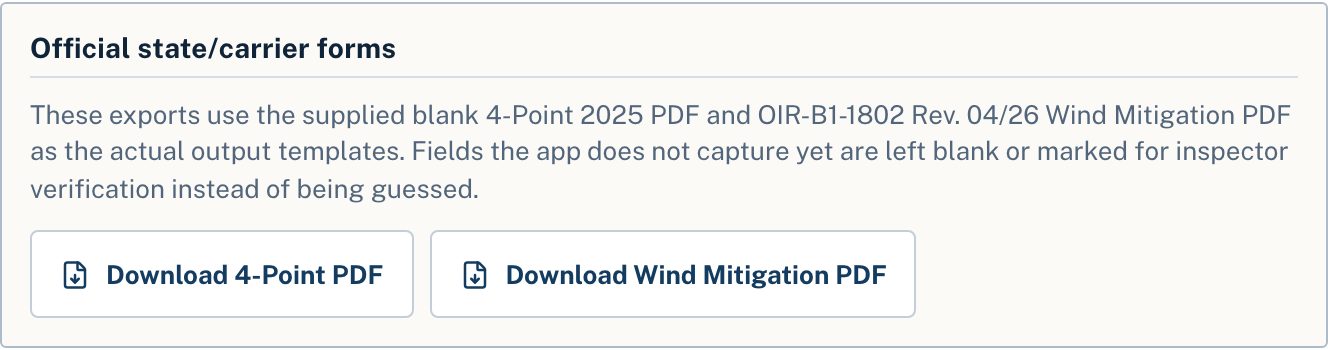
The 4-Point export uses the official 2025 Florida form; wind mitigation uses OIR-B1-1802 (Rev. 04/26). Fields you haven't verified are always left blank — never guessed.

Report exportsOfficial templates
Official form exports: Florida 4-Point and Wind Mitigation PDF downloads
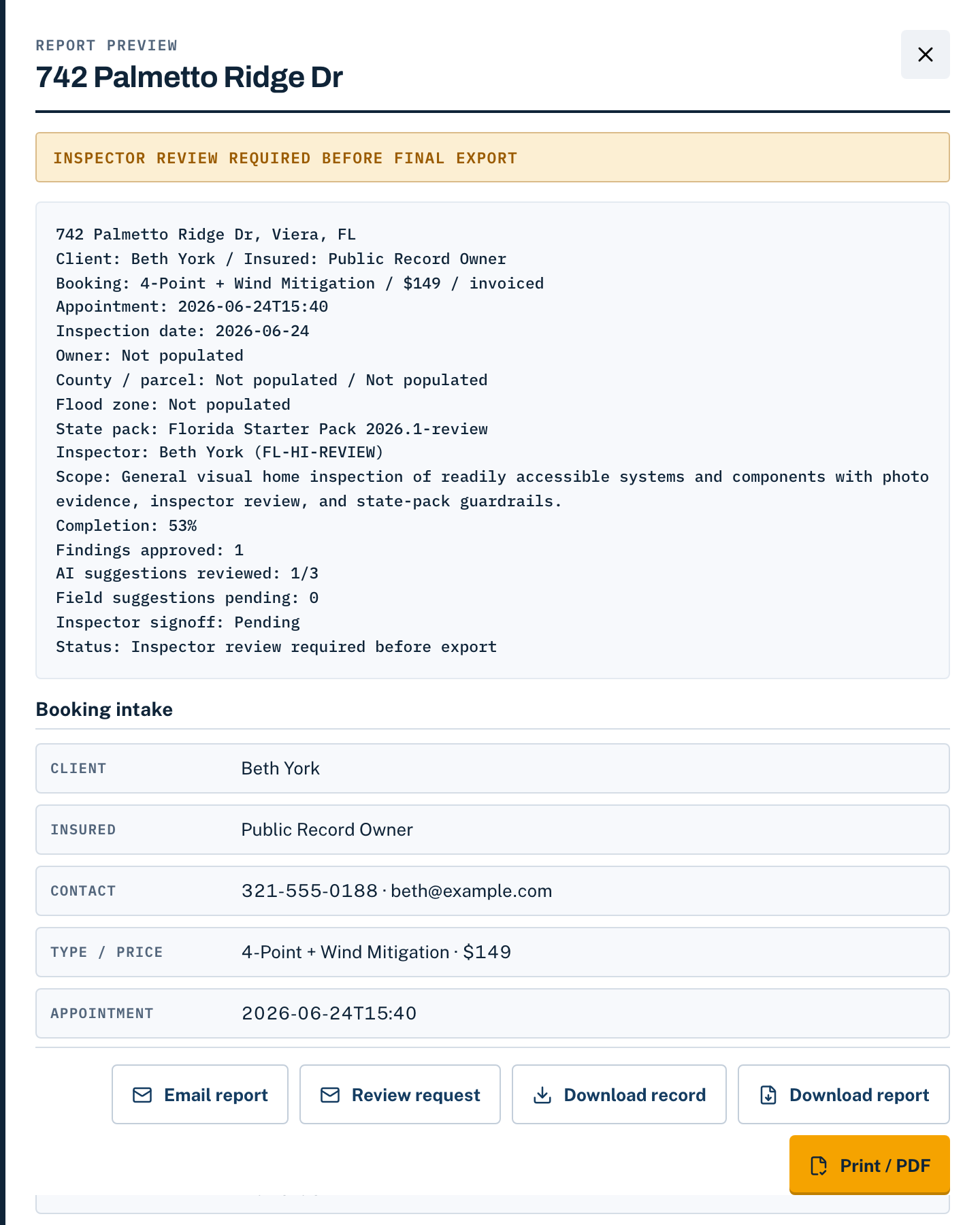
Report previewReady to send
Report preview with readiness status and booking details

Sec 08 — Built to earn it

Your name goes on the report. This tool treats that like it matters.

You have the final say — always

Every drafted finding and suggested answer comes to you first — approve it, change it, or throw it out. The report can't be finalized until you've reviewed each one. The tool suggests; the licensed inspector decides.

Blanks stay blank

If the inspection didn't establish it, the form doesn't say it. Unverified fields are left blank on every export — never guessed, never filled in on your behalf. And when the AI isn't sure, it says so and asks for a better photo.

Your clients' information stays with you

Inspection data lives on your own device, and you can save a complete copy of any job whenever you like. Your plan pays for the tool — it never holds your files hostage. Your business stays your business.

Built on a job site, not in a boardroom

Built with York Home Inspections in Brevard County, Florida, around the way inspections actually run in Melbourne, Viera, and Rockledge. Every screen exists because a working inspector needed it.

Do the math your own way

It doesn't have to save an hour to be worth it.

Skip one drive-back, or head off one carrier kickback and the redo that comes with it, and the year's already paid for. Mostly it buys back the one thing you can't get more of — the evening you'd have spent rebuilding forms at the kitchen table. Run even a handful of insurance jobs a month and it pays for itself the first night you get home done. Put honestly: the price isn't $20 versus $0 — it's your license doing clerk work versus doing the work only your license can do.

$98 / year, unlimited

Under $2 a week — less than one tank of gas a month, for every insurance inspection you run.

Sec 09 — The offer

First inspection free — start to signed.

Sign up with your email and a card on file (not charged for the trial), then run one complete job from booking to signed report — so you feel the evening you get back before you ever pay a dime. After that, keep it however fits the way you work.

The trial

1st inspection on us

Sign up with your email and put a card on file — your first inspection is the trial, start to signed report.

  • One complete inspection
  • Research, photos & official forms
  • Card on file — not charged for the trial
Start the trial

Pay per pull

$5 per inspection pull

No subscription — pay for the one job in front of you and nothing else.

  • One property pull per purchase
  • Full records research + forms
  • No monthly commitment
Buy a pull

Professional

$20 per month

For the working inspector — covers a steady week-in, week-out schedule.

  • Up to 10 inspections a month
  • Every feature in the tool
  • Cancel anytime
Go monthly

Nothing to install. Cancel anytime. Your saved work stays yours — the trial's card on file just makes pull #2 one tap, not another signup.

Sec 10 — Fair questions

Asked by inspectors, answered straight.

Is the AI going to put wrong answers on a form I have to sign?

The app drafts and pencils in answers, but it can't finalize a report without you — you approve, edit, or reject every single one, and it won't finalize until each has been reviewed. Unverified fields are left blank, never guessed, and when it isn't sure it says so and asks for a better photo. The AI never signs anything. Your license does.

$20 a month adds up — is it really worth it?

Compare it to one evening, not to other apps. Skip a single drive-back or head off one bounced report and the year's already covered. If getting home to your family instead of the kitchen-table form even once a month is worth twenty bucks, it's already paid for. Run the unlimited year at $98 and it's under $2 a week — less than a tank of gas.

Do I have to install anything or learn new software?

Nothing to install. It runs in your browser on the phone, tablet, or laptop you already carry to the job. Paste tomorrow's booking straight from Google Calendar and you're working — and the appointment syncs right back to your calendar.

Are these the actual forms carriers accept, or a look-alike?

The real ones — the official Florida 4-Point (2025 edition) and Wind Mitigation OIR-B1-1802 (Rev. 04/26), filled on the real state templates with your captioned photo pages appended. What you email the client is the official document. A full Standards-of-Practice report is there for full-home jobs too.

Does it only work in Brevard County?

It works statewide in Florida — records pull from FDOR plus the county appraisers and permit portals across the state. Every value shows its source with a link so you can verify it or override it. It was built in Brevard County with York Home Inspections, around the Melbourne, Viera, and Rockledge market.

What if the public record is wrong?

Every pulled value shows its source with a link, and you can override anything. You're never stuck with a number you don't trust — you confirm it against the property and correct it right there before it goes on the form.

Where does my inspection data live, and am I locked in?

On your own device. You can save a complete backup anytime, and if you ever cancel, your saved work stays yours.
Ready when you are

Your next inspection can end in the driveway.

Run the first one free tonight — booking to signed report, on us. Sign in the driveway, email the client the official PDFs, and for once, drive home with nothing left to do. Nothing to install, card on file but not charged for the trial, cancel anytime.

Run your first inspection free

First inspection on the trial · $5 a pull · $20/mo for 10 · $98/yr unlimited

Nothing to installOfficial Florida formsYou approve every findingData stays on your device