
Independent family resource: all source links below go to official or long-standing community pages. Always follow each page or group’s posting rules.
Updated July 14, 2026 · Written for USCGA families by the CadetCatch team
During Swab Summer, photos are one of the few windows families have into daily life in New London. Official releases, volunteer photo drops, social pages, and long-running archives can put thousands of images in front of you. Knowing where to look matters. Having to inspect every face in every frame does not. This guide shows you both: where photos appear and how CadetCatch turns the available indexed collection into a focused review.
How CadetCatch turns thousands of photos into a shortlist
CadetCatch uses state-of-the-art facial-similarity methods to compare one clear photo of your cadet with faces in the available indexed event-photo collection. Instead of opening image after image, you review a ranked set of likely matches and save the moments you recognize.
Add your cadet in Roster
Choose one clear, front-facing photo from your iPhone with only your cadet visible.
Tap Search Photos
From Home, start the search. CadetCatch compares your reference photo with faces in the indexed collection and ranks likely matches.
Review and save what you recognize
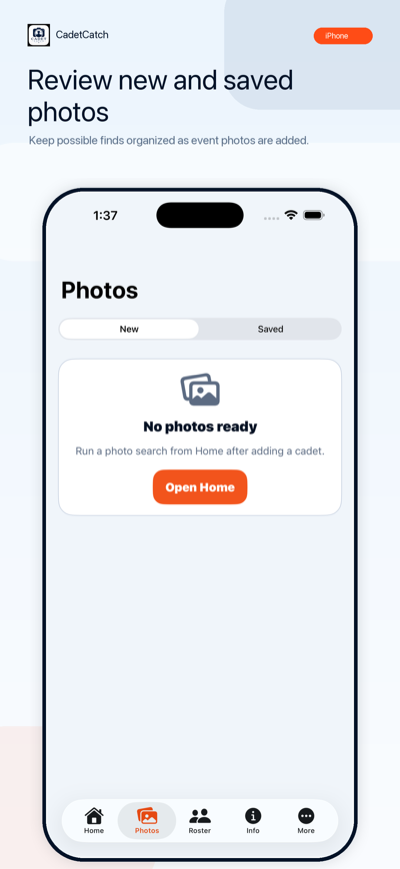
Open Photos, inspect each suggestion, and save the matches you recognize to your iPhone.
You stay in control: CadetCatch finds facial similarities and ranks possible matches. It does not guarantee an identity or decide who is in a photo. You make the final call.
Spend your time finding the moments, not opening every image.
Download CadetCatch free, add one clear photo, and start your first focused search.
Download free on theApp StoreThe Swab Summer 2026 timeline
| When | What happens |
|---|---|
| Mon, June 29, 2026 | Day One. Haircuts, gear issue, the class photo, a 15-minute goodbye. The Coast Guard published an official Day One photo release the same week (link below). |
| Weeks 1–4 (late June – late July) | Training on campus. No visits, no phones. Photos posted online are the only window in. This is when to check sources most often. |
| ~Week 4 (estimated late July) | Class-flag ceremony at Mystic Seaport — historically the first event families may attend, with swab phone time afterward. The 2026 date had not been announced when this guide was published; watch the official channels below rather than trusting anyone's guess, including ours. |
| ~Mid-August (estimated) | Sea Trials, then Swab Summer graduation. In 2025 graduation fell on August 16; the 2026 dates were not yet announced at publication. The Alumni Association's summer eNews pages usually carry the specifics. |
| Mon, Aug 24, 2026 | Classes begin, per the Academy's published calendar. |
| Sep 25–27, 2026 | Family Weekend (confirmed on the Academy's yearly calendar). You'll take your own photos for a change. |
Turn the next photo drop into a focused search.
Add one clear cadet photo, tap Search Photos, and review likely matches from the indexed collection on your iPhone.
Download free on theApp StoreWhere Swab Summer photos actually post
1. The Academy's official Facebook page
Check daily during weeks 1–4
facebook.com/CoastGuardAcademy is the Academy's most active official channel and posts Swab Summer updates and photo sets through the summer. Follow the page and turn on notifications so batches don't slip past you.
2. The Academy's official Instagram
Check a few times a week
@uscg_academy posts highlights rather than full galleries, and its captions often credit the volunteer photographers shooting that week — a useful tip-off about whose page to check next for the full set.
3. Coast Guard photo releases: news.uscg.mil and DVIDS
Check around milestones
Official Coast Guard imagery goes out through the service's newsroom and the Defense Visual Information Distribution Service. The Day One release for the Class of 2030 is already up: Photo Release — Day One for Class of 2030. Bookmark news.uscg.mil and search dvidshub.net for “Coast Guard Academy” — these are high-resolution, public-release photos, and big events usually get a dedicated gallery.
4. Pduddy pics (Paul Duddy, volunteer photographer)
Confirm he is covering your class first
For many years, one of the biggest sources of Swab Summer photos has been Pduddy pics, the Facebook page of longtime volunteer photographer Paul Duddy. The Academy's own family guidance points parents to his page because the resident photographer posts large volumes of Swab Summer pictures.
One honest caveat: as of publication we could not confirm his posting schedule for the Class of 2030, so check the page yourself to see whether he's covering your swab's class this summer. If he is, it will be obvious — and it will likely be your highest-volume source.
5. The Academy's Flickr archive
Check once, then bookmark the archive
flickr.com/photos/uscoastguardacademy holds 36,000+ photos, and in past years the Academy posted weekly Swab Summer albums named by date (“210628 / Class of 2025 Day 1” style). The account has not shown new albums since 2021 as of our last check, so treat it as an archive and a maybe — glance occasionally, but don't rely on it for this summer.
6. The Parents Association
Join once, then follow their alerts
The Coast Guard Academy Parents Association at cgaparents.org runs regional chapters, a quarterly newsletter, and a members-only photo gallery benefit. Its all-class Facebook group, facebook.com/groups/CGA.PA, is where experienced parents flag new photo drops fast — often faster than you'll find them on your own.
7. Your class Facebook groups
Check daily — other parents are your early-warning system
The official group for the incoming class is facebook.com/groups/uscga2030 (listed in the Academy's own Applicant Handbook). Per-class parent groups also follow the naming pattern “USCGA - Parents - Class of 20XX” and are hand-moderated by experienced parents — search Facebook for the Class of 2030 parents group and answer the join questions honestly. When a new gallery posts, someone in these groups knows within the hour.
8. The Alumni Association's summer pages and galleries
Check weekly from late July
The Alumni Association at cgaalumni.org publishes “Swab Summer eNews” pages each summer — usually the first place Sea Trials and graduation specifics appear — and hosts photo galleries at cgaalumni.smugmug.com.
Two official Academy pages worth reading once: the Academy's Swab Summer tips and the yearly calendar of events for confirmed dates like Family Weekend.
How to actually spot your swab
Every parent learns this the hard way: after Day One haircuts, they all look alike. What works:
- Know the company. The class is split into eight companies, and photographers often caption or album by company and training event. Once your swab's first letter home confirms their company, you can skip half of every gallery.
- Learn the shirt colors. Companies frequently wear distinct shirt colors during training evolutions. Match the color first, then look at faces.
- Zoom in on name tapes. On uniforms and PT gear, the name tape is the only sure ID. Zoom before you decide it's not them.
- Check the backgrounds. Your swab is just as likely to be the slightly blurry figure in the second rank as the subject of the photo. Scan the whole frame, not just the center.
- Anchor on the things a haircut doesn't change. Glasses, height relative to neighbors, posture, the way they run. You know your kid's walk from three hundred yards — trust that.
- Keep track of what you've found. Save the photo where the source permits downloads, note the album and date, and log it somewhere. Come graduation, you'll want the whole summer in order.
Photo etiquette in the parent community
- Don't repost other families' kids without asking. A photo of your swab usually includes six other swabs. Cropping or asking first is the norm in these groups, and moderators enforce it.
- Follow each group's rules. The class and Parents Association groups are hand-moderated. Read the pinned posts before posting; promotional and off-topic posts get removed.
- Thank the photographers. The people shooting thousands of frames in July heat are volunteers. A comment or a note costs nothing and keeps this whole ecosystem going.
- Save the photos for your swab too. They can't see any of this right now. A curated album of their own summer is one of the best gifts you can hand them at graduation.
When the next gallery drops, search with the face you already know.
CadetCatch compares one clear cadet photo with faces in the available indexed collection, shows likely matches for you to review, and lets you save the moments you recognize.
Download free on theApp StoreCurrent U.S. App Store options: $1.99 One-Time Photo Check, $1.99 Unlock One Photo, or $12.99/month Family Monthly.